tcam.gif (6094 bytes)   mouse.gif (3933 bytes)


benefit.gif (1315 bytes)

Powerful dimensioning feature

Provides multiple degree-of-freedom dynamic dragging of dimensioning.

Supports ordinate dimensioning

Flexible and versatile dimension construct feature during dimensioning process.

Open architecture and dimension variable set to support standard codes such as ISO, DIN, JIS …etc.

Dimension styles and positions are easily changed with a single CHANGE command.

Provides geometric tolerance setting feature.

Individual dimension settings like arrow type, dimension text position and scaling are easily controlled through SETDIM command.

Quick setting and modification of dimension text content.

Spline leader support. 

Unparalleled analytical geometry feature

Provides over 120 solutions for circle construct.

Dynamic and intuitive circle constructing process.

Versatile Solid Fill feature

Solid FILL for any irregular-shaped closed area or a group of closed area  (defined REGION).

Solid FILL on TrueType fonts or PostScript Type 1 fonts.

Built-in function for extended CAM application

CAD function: MINSERT command to provide self-rotation and array-rotation angles for rectangular array of BLOCK inserts.

CAM application: NESTING in Laser Cutting.

CAD function: TEXT exploded into primary entities with SPLINE curve fitting.

CAM application: Plotter-Cutting for high quality TEXTs.

Compatible with AutoCAD DWG/DXF formats through R14

The DWG format compatibility issue that exists for years among different AutoCAD releases is addressed and resolved with TwinCAD. Now you may directly open AutoCAD DWG files from R9 through R14 without any difficulty.

Compatible with most AutoCAD commands

Similar operation procedure to AutoCAD

Quick at drawing editing

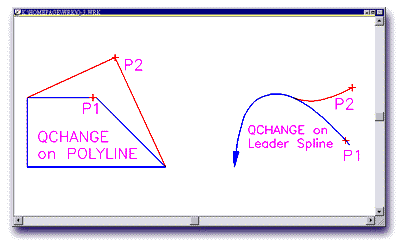
QCHANGE command for quick change of entity properties/attributes such as length/radius, text content, dimension extension lines, and dynamic change of segment node points for POLYLINEs and LEADER lines.

Q-3.gif (7448 bytes)

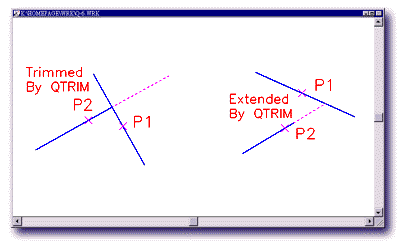
QTRIM command to combine the TRIM and EXTEND function for a simplified and more efficient operation.

Q-6.gif (6941 bytes)

Fast displaying mode

FASTLType variable setting to allow quick regen of drawings with complex linetypes.

AUTOQTEXT variable setting to display only TEXT frames for quick regen.

Automatic convert lines to polylines

BPOLY to provide area calculation for multiple objects

Allow multiple undo's and redo's

Trim or Extend to TEXT

Useful geometric data provided

Useful entity information such as area, centroid, and perimeter for selected entities are automatically calculated.

Toolbars, Menus, Command Aliases

Conforms to industry leading CAD operation practice

Extensive online help document

Assorted toolbar menus with annotations

leaf.gif (1825 bytes)
Go to top